Sunday, November 30, 2008

investigate


guiding question-how can you communicate through internet when disaster strikes
You can communicate from different countries on messengers such as Msn skype Icq and aim also there are many more that can be used firstly you make an account for the messenger then you add your friends and then you just go and call your friends or you can type also if you have a webcam you can see each other through the internet this is new technology and they are developing more and more

Saturday, November 29, 2008

Grade 7 IT investigation

MYP DESIGN CYCLE

The MYP design cycle has four parts Investigate,plan,create and evaluate.Investigate iswhen you research about the thing you are doing. Plan is when you plan on how you are going to do it.
create is making the things you investigate and evaluate what you did and what your results were.

Sunday, November 23, 2008

Evaluation

EvaluationIn our project the wikispaces worked well also the creating part, we used wikispaces and blogs to record out information-investigate, What we are goin to do and find out things about it-design/plan, Design your robot and what it is going to do-Create, Create your robot with lego mindstorms-Evaluate, Everything that you did in recorded information , what worked, how can it be improved etc.-Reflection, How to improveOur robot can be improved by the programming and aslo when we were searching for information. Our design and plan went well also the create stage there was no mistakes.We used the Wikispaces and the blogs for recording the investigation stage, design/plan,create,evaluation and reflection. We didnt make an Animoto because we were not told to make one.The robot rules are
1.A robot may not injure a human being or, through inaction, allow a human being to come to harm.
2.bot may not injure a human being or, through inaction, allow a human being to come to harm.
3.A robot must obey orders given to it by human beings, except where such orders would conflict with the First Law.
A robot must protect its own existence as long as such protection does not conflict with the First or Second Law.We used winlogo to get a feeling how the robot worked, forward X,backwards X,right Y, left YWe created Robolab and we made the program for the robot and then we uploaded it and connected the towers then automaticly the program connects to the robot The robot has
1.sensors
2.actuators
3.power
4.procceser
5.control commands
What worked well?
in our project our robot was good it was not hard to build and connecting to the tower to the robot was easy also.

Monday, October 20, 2008

investigate

The parts of designing a robot: are that you can program the robot as you want for example you can program the robot to follow a white line for an easy example it could be just moving forwards and back wards for the middle of programming a robot it could be moving forwards left right and more steps, the hardest one would be searching a white line then following the white line so if it starts 30cm away and you say go 5 steps and it wont find it, then it goes back then it moves 20 degrees and goes 5 steps if it didn't find it it goes back it does that till it finds it did a full circles it will go 10 steps then if it found it on 7 steps it will stop and see if there is more on the 8th step if not it move's back then goes 20degrees or 40 degrees if it finds the white line it will follow the line till it ends, there is your hardest program.

Monday, September 22, 2008

Robotics


SENCES


Sensor
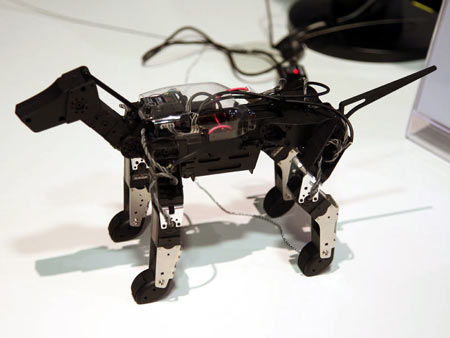
This picture shows you a camera which is the proximity sensor it can be used to move away from objects in there way example
if the robot is moving towards a wall the robot will sense this and automatically turn around and move away from the wall, there are different kinds of sensors another example is a light sensor when there is not enough light the sensor turns on and produces light with its energy source which could be a battery, here below is a picture of a light sensor.


sense information about environment


DECIDES
Processors

1. Decides on what action to take based on sensors information
ACTS


Actuators
1. Control gear, levers, wheels, pully's and other output devices to get the job done


For the robot you need sences so it will have to be able to sense information about the environment it is in.
The robot will need processors which means you will have to program it to do what you want e.g. following the
white line or in a boundary you can program robots to do many things , like guarding orders so the robot would
guard what you want. the robot you build will need Actuators so it will need the pieces so the control gears, levers
wheels, pully's and other output devices to get the job finished the robot will need gears and wheels to move and all
the other things to move and do the things it was processed to do, but to do all the things the robot will need a battery.

Monday, September 1, 2008

My Summer

In my summer i had fun, we went to germany in a place called Bocholt this is where we live in a flat. Some of my friends live in Bocholt and we did many things and also we went to Amsterdam there it was amazing.Me and my friends went fishing alot under a bridge a few kilometers away we alwaays reached it with bikes.I had LOADS of fun in my summer and im looking forward to see my friends and do things with my family hope i have fun next year as much as i did this year.

Tuesday, May 27, 2008

Evaluation

for our project we did the E-book this is an electronic book e.g you can download ANY book on it so you save paper(trees) and ink. We investigated the E-book on the Internet we had found many information.Also we did a plan so we would gather pictures and then make a voice thread,also an animoto we had put our animoto in our voice thread to make it better than before.

In our voice thread we had some problems we had lost all of pictures when we wanted to do it,so it didn't save our work. After when we did the animoto we had to technical difficulties everything went good! We were relived that we didn't have any problems.

overall we did very good we were happy with our work that we had done, the strength's of our story were there was a good begining, we had good pictures and also we could explain it very good, exspecally the the animoto was very good. What we could have done better is that we should have bookmark the tags on delicious this would have done it better. I recommend this product for next year this is beacause you can get good information on it and it is very helpful in classrooms.